pico-286
🕹️ Pico-286 Project
The Pico-286 project is an endeavor to emulate a classic PC system, reminiscent of late 80s and early 90s computers, on the Raspberry Pi Pico (RP2040/RP2350 microcontroller). It aims to provide a lightweight and educational platform for experiencing retro computing and understanding low-level system emulation. 🖥️✨
⭐ Key Features
- 🧠 8086/8088/80186/286 CPU Emulation: At its core, the project emulates an Intel cpu up to 286 family.
- 🌐 Cross-platform: Can be built for Raspberry Pi Pico, Windows, and Linux.
- 🔌 Retro Peripheral Emulation: Includes support for common peripherals from the era.
- 🎨 Text and Graphics Modes: Supports various display modes common in early PCs.
- 🔊 Sound Emulation: Recreates sound capabilities of classic sound cards.
- 🍓 Designed for Raspberry Pi Pico: Optimized for the RP2040/RP2350 with minimal external components.
🎮 Supported Hardware Emulations
🧠 CPU Emulation
- Intel 8086/8088/80186/286 processor family
🎵 Sound Card Emulations
- 📢 PC Speaker (System Beeper): Authentic emulation of the original PC’s internal speaker system
- 🎚️ Covox Speech Thing: Compatible emulation of the simple parallel port DAC
- 🎭 Disney Sound Source (DSS): Emulation of the popular parallel port digital audio device
- 🎹 Adlib / Sound Blaster (OPL2 FM Synthesis): High-quality emulation of the Yamaha OPL2 chipset for classic FM music and sound effects.
- 🔊 Sound Blaster (Digital Audio): Support for Sound Blaster’s digital sound capabilities, including DMA-based playback.
- 🎼 MPU-401 (MIDI Interface with General MIDI Synthesizer): Provides a MIDI interface and includes an integrated General MIDI (GM) software synthesizer, allowing playback of GM scores without external MIDI hardware. This is a key feature for many later DOS games.
- 📢 Tandy 3-voice / PCjr (SN76489 PSG): Emulation of the Texas Instruments SN76489 Programmable Sound Generator.
- 🎮 Creative Music System / Game Blaster (CMS/GameBlaster): Emulation of the dual Philips SAA1099 based sound card.
🖼️ Graphics Card Emulations
📝 Text Modes (Common to All Graphics Cards)
All graphics card emulations support standard text display modes for character-based applications:
- 16 foreground colors with 8 background colors
- Full color attribute support including blinking text
📝 Standard Text Modes:
- 80×25 Text Mode: Standard 80 columns by 25 rows character display
- 40×25 Text Mode: Lower resolution 40 columns by 25 rows display
🚀 Advanced CGA Text Modes (8088 MPH Demo Techniques):
- 🎨 160×100×16 Text Mode: Ultra-low resolution high-color text mode
- Revolutionary technique showcased in the famous “8088 MPH” demo by Hornet
- 16 simultaneous colors from CGA palette in text mode
- Achieved through advanced CGA register manipulation and timing tricks
- Demonstrates the hidden capabilities of original CGA hardware
- 🌈 160×200×16 Text Mode: Enhanced color text mode
- Extended version of the 8088 MPH technique with double vertical resolution
- Full 16-color support in what appears to be a text mode
- Pushes CGA hardware beyond its original specifications
- Compatible with software that uses advanced CGA programming techniques
🎨 CGA (Color Graphics Adapter)
The CGA emulation provides authentic IBM Color Graphics Adapter functionality, supporting the classic early PC graphics modes:
🎮 Graphics Modes:
- 🌈 320×200×4 Colors: Standard CGA graphics mode with selectable color palettes
- ⚫⚪ 640×200×2 Colors: High-resolution monochrome mode (typically black and white)
- 📺 Composite Color Mode (160×200×16): Emulates the artifact colors produced by CGA when connected to composite monitors, creating additional color combinations through NTSC color bleeding effects
📊 HGC (Hercules Graphics Card)
The Hercules Graphics Card emulation recreates the popular monochrome high-resolution graphics standard:
🖥️ Graphics Mode:
- ⚫⚪ 720×348×2 Colors: High-resolution monochrome graphics mode
🖥️ EGA (Enhanced Graphics Adapter)
The Enhanced Graphics Adapter emulation provides IBM EGA compatibility with full 16-color support:
🚀 Enhanced Graphics Modes:
- 🎨 320×200×16 Colors: EGA mode 0x0D with planar memory access
- 🌈 640×200×16 Colors: EGA mode 0x0E high-resolution 16-color mode
- ✨ 640×350×16 Colors: EGA mode 0x10 professional graphics mode
🖥️ TGA (Tandy Graphics Adapter)
The Tandy Graphics Adapter emulation recreates the enhanced graphics capabilities of Tandy 1000 series computers:
🚀 Enhanced Graphics Modes:
- 🎨 160×200×16 Colors: Low-resolution mode with full 16-color palette
- 🌈 320×200×16 Colors: Medium-resolution mode with 16 simultaneous colors from a larger palette
- ✨ 640×200×16 Colors: High-resolution mode with 16-color support
🖼️ VGA (Video Graphics Array)
The VGA emulation provides comprehensive Video Graphics Array support with planar memory architecture and multiple advanced modes:
📊 Standard VGA Modes:
- 🎮 320×200×256 Colors: Mode 13h with chain4 memory access
- 🖥️ 640×480×16 Colors: Standard VGA high-resolution mode (Mode 12h)
- 🖥️ 640×480×2 Colors: Monochrome VGA mode (Mode 11h)
- 📝 Text modes: 80×25 and 80×50 with enhanced character sets
🔧 VGA Technical Features:
- Planar Memory Layout: 256KB video memory organized as 4 color planes (0xP3P2P1P0 format)
- 32-bit Latch System: Hardware-accurate latch emulation for planar operations
- Chain4 Mode Support: Proper VGA chain4 mode handling for 256-color modes
- Hardware Registers: Full VGA register compatibility including sequencer and graphics controllers
💾 Storage: Disk Images and Host Access
The emulator supports two primary types of storage: virtual disk images for standard DOS drives (A:, B:, C:, D:) and direct access to the host filesystem via a mapped network drive (H:).
Virtual Floppy and Hard Disks (Drives A:, B:, C:, D:)
The emulator supports up to two floppy disk drives (A: and B:) and up to two hard disk drives (C: and D:). Disk images are stored on the SD card.
The emulator expects the following file paths and names for the disk images:
- Floppy Drive 0 (A:):
\\XT\\fdd0.img - Floppy Drive 1 (B:):
\\XT\\fdd1.img - Hard Drive 0 (C:):
\\XT\\hdd.img - Hard Drive 1 (D:):
\\XT\\hdd2.img
Important Notes:
- The disk type (floppy or hard disk) is determined by the drive number it is assigned to in the emulator, not by the filename itself.
- The emulator automatically determines the disk geometry (cylinders, heads, sectors) based on the size of the image file. Ensure your disk images have standard sizes for floppy disks (e.g., 360KB, 720KB, 1.2MB, 1.44MB) for proper detection. For hard disks, the geometry is calculated based on a standard CHS (Cylinder/Head/Sector) layout.
Host Filesystem Access (Drive H:)
For seamless file exchange, the emulator can map a directory from the host filesystem and present it as drive H: in the DOS environment. This feature is implemented through the standard DOS network redirector interface (INT 2Fh, Function 11h).
This is ideal for development, allowing you to edit files on your host machine and access them instantly within the emulator without modifying disk images.
How It Works
The emulator intercepts file operations for drive H: and translates them into commands for the host’s filesystem. To enable this drive, you must run the MAPDRIVE.COM utility within the emulator.
The mapped directory depends on the platform:
- On Windows builds: Drive H: maps to the
C:\\FASMdirectory by default. - On Linux builds: Drive H: maps to the
/tmpdirectory by default. - On Pico builds (RP2040/RP2350): Drive H: maps to the
//XT//directory on the SD card.
MAPDRIVE.COM Utility
The tools/mapdrive.asm source file can be assembled into MAPDRIVE.COM using FASM. This utility registers drive H: with the DOS kernel as a network drive.
Prerequisite: Before using MAPDRIVE.COM, ensure your CONFIG.SYS file contains the line LASTDRIVE=H (or higher, e.g., LASTDRIVE=Z). This tells DOS to allocate space for drive letters up to H:, allowing MAPDRIVE.COM to successfully create the new drive.
To use it:
- Assemble
mapdrive.asmtomapdrive.com. - Copy
mapdrive.comto your boot disk image (e.g.,fdd0.imgorhdd.img). - Run
MAPDRIVE.COMfrom the DOS command line. - Add
MAPDRIVE.COMto yourAUTOEXEC.BATto automatically map the drive on boot.
🔧 Hardware Configuration
The Pico-286 emulator is designed to run on Raspberry Pi Pico (RP2040) based hardware. 🍓
🎛️ Supported Components
- ⌨️ PS/2 keyboard and mouse
- 💾 SD card for storage
- 📺 VGA and HDMI for video output
- 🔊 Audio output
- 🎮 NES gamepad
🏗️ Minimal Configuration
- 🍓 Raspberry Pi Pico (RP2040)
- 🧠 External PSRAM chip (minimum 8MB recommended) connected via SPI.
🚀 Recommended Configuration for Maximum Performance
- 🍓 Raspberry Pi Pico 2 (RP2350)
- ⚡ Butter-PSRAM or onboard PSRAM for faster memory access
- 🖥️ HDMI or VGA output for best graphics performance
🛠️ Development Platform
- This project primarily uses the MURMULATOR dev board as its hardware base. This board provides an RP2040/RP2350, PSRAM, and various peripherals suitable for the emulator’s development and testing. 🎯
🔧 Supported PSRAM Configurations
The emulator automatically detects and configures various PSRAM hardware:
- 🧈 Butter-PSRAM: Auto-detection with dynamic GPIO pin assignment
- GPIO 8: MURM20 board configuration
- GPIO 47: PIMO board configuration
- GPIO 19: Default configuration
- 📦 Onboard PSRAM: RP2350 built-in PSRAM support
- 💾 Generic PSRAM: Standard external PSRAM chips via SPI
Memory Detection: Runtime PSRAM size detection (16MB, 8MB, 4MB, 1MB) with validation through test patterns
🔌 Default Pinout
The emulator has a default GPIO pin configuration for its peripherals on the Raspberry Pi Pico. These are defined in CMakeLists.txt and can be modified there if needed.
| Peripheral | GPIO Pin(s) | Notes |
|---|---|---|
| VGA Output | 6 (base pin) | Sequential pins used for RGB |
| HDMI Output | 6 (base pin) | |
| NTSC TV Out | 22 | Composite video output |
| TFT Display | CS: 6, RST: 8, LED: 9, DC: 10, DATA: 12, CLK: 13 | ST7789 driver |
| SD Card | CS: 5, SCK: 2, MOSI: 3, MISO: 4 | SPI0 |
| PSRAM | CS: 18, SCK: 19, MOSI: 20, MISO: 21 | Generic external PSRAM |
| NES Gamepad | CLK: 14, DATA: 16, LAT: 15 | Used for mouse emulation if needed |
| I2S Audio | CLOCK: 17, PCM: 22 | |
| PWM Audio | Beeper: 28, L: 26, R: 27 |
⚙️ Platform-specific Details
The emulator’s resource allocation changes based on the target platform and build options.
Conventional RAM (RAM_SIZE)
This is the amount of memory available to the emulated PC as conventional memory (e.g., the classic 640KB).
| Platform | Memory Configuration | Available RAM |
|---|---|---|
| Host | N/A | 640 KB |
| RP2350 | PSRAM (default) | 350 KB |
| RP2350 | Virtual Memory | 200 KB |
| RP2040 | PSRAM (default) | 116 KB |
| RP2040 | Virtual Memory | 72 KB |
Audio Sample Rate (SOUND_FREQUENCY)
The audio quality depends on the platform and the chosen audio output method.
| Platform | Audio Option | Sample Rate |
|---|---|---|
| Any | HARDWARE_SOUND=ON |
44100 Hz |
| Host | Any other option | 44100 Hz |
| RP2350 | Any other option | 44100 Hz |
| RP2040 | Any other option | 22050 Hz |
Extended Memory (EMS/XMS)
To run more advanced DOS applications and games, the emulator supports two types of extended memory systems, providing memory beyond the conventional 640KB limit. The active system is chosen at compile time.
1. PSRAM (Pseudo-Static RAM)
This is the high-performance default method, used when a hardware PSRAM chip is available.
- How it works: It directly communicates with an external PSRAM chip over a high-speed SPI interface, managed by the Pico’s PIO and DMA for maximum performance.
- When to use: This is the recommended option for all platforms that have a PSRAM chip (like the RP2350 or custom boards). It provides the best performance for applications requiring EMS or XMS memory.
- Configuration: Enabled by default. For RP2350, use the
ONBOARD_PSRAM=ONoption. For external PSRAM, ensure the pinout is correct.
2. Virtual Memory (Swap File)
This is a fallback system for hardware that lacks a PSRAM chip, primarily intended for memory-constrained RP2040 boards.
- How it works: It implements a paging system using a swap file named
pagefile.syslocated in the\\XT\\directory on the SD card. The Pico’s internal RAM is used as a cache for memory “pages”. When the requested memory is not in the cache (a page fault), it is read from the SD card. - Performance: This method is significantly slower than PSRAM due to the latency of SD card access. You may notice the Pico’s LED flash when the system is “swapping” pages to and from the SD card.
- When to use: Use this option only on hardware without PSRAM. It provides compatibility for applications that require more memory than is physically available on the Pico, at the cost of performance.
- Configuration: Enabled by setting
TOTAL_VIRTUAL_MEMORY_KBSto a non-zero value (e.g.,-DTOTAL_VIRTUAL_MEMORY_KBS=512). This will automatically disable the PSRAM driver.
🏛️ Platform Architecture
The emulator uses different architectures depending on the target platform to best utilize the available resources.
Raspberry Pi Pico (Dual-Core)
The Pico build takes full advantage of the RP2040/RP2350’s dual-core processor.
- Core 0: Runs the main CPU emulation loop (
exec86) and handles user input from the PS/2 keyboard and NES gamepad. - Core 1: Dedicated to real-time, time-critical tasks. It runs an infinite loop that manages:
- Video rendering (at ~60Hz).
- Audio sample generation and output.
- PIT timer interrupts for the emulator (at ~18.2Hz).
This division of labor ensures that the demanding CPU emulation does not interfere with smooth video and audio output.
Windows & Linux (Multi-threaded)
The host builds (for Windows and Linux) are multi-threaded to separate tasks.
- Main Thread: Runs the main CPU emulation loop (
exec86) and handles the window and its events via the MiniFB library. - Ticks Thread: A dedicated thread that acts as the system’s clock. It uses high-resolution timers (
QueryPerformanceCounteron Windows,clock_gettimeon Linux) to trigger events like PIT timer interrupts, rendering updates, and audio sample generation at the correct frequencies. - Sound Thread: A separate thread responsible for communicating with the host operating system’s audio API (WaveOut on Windows, a custom backend on Linux) to play the generated sound without blocking the other threads.
This architecture allows for accurate timing and responsive I/O on a non-real-time desktop operating system.
🔨 Building and Getting Started
📋 Prerequisites
For Raspberry Pi Pico builds:
- Pico SDK: Install and configure the Raspberry Pi Pico SDK
- CMake: Version 3.22 or higher
- ARM GCC Toolchain: For cross-compilation to ARM Cortex-M0+/M33
- Git: For cloning the repository and submodules
For Windows host builds:
- CMake: Version 3.22 or higher
- MSVC/GCC: C++20 compatible compiler
- Git: For cloning the repository
For Linux host builds:
- CMake: Version 3.22 or higher
- GCC/Clang: C++20 compatible compiler (GCC 11+ or Clang 13+)
- Git: For cloning the repository
- X11 development libraries: Required for graphics output
- Threading support: pthread library (usually included with GCC)
🛠️ Build Configuration
The project uses CMake with platform-specific configurations. All builds require exactly one display option and one audio option.
🖥️ Display Options (Choose exactly one):
ENABLE_NTSC-TV=ON- NTSC TV output (locks CPU frequency to 315MHz)ENABLE_TFT=ON- TFT display output via ST7789ENABLE_VGA=ON- VGA outputENABLE_HDMI=ON- HDMI output (dynamic frequency: 504MHz for Pico2, 378MHz for others)
🔊 Audio Options (Choose exactly one):
ENABLE_I2S_SOUND=ON- I2S digital audio outputENABLE_PWM_SOUND=ON- PWM audio outputENABLE_HARDWARE_SOUND=ON- Hardware DAC audio output
🧠 Memory Configuration:
- PSRAM (Default for RP2350):
- Auto-detection enabled by default for compatible hardware
- Manual:
ONBOARD_PSRAM=ON- Use onboard PSRAM (RP2350 only) - Manual:
ONBOARD_PSRAM_GPIO=19- GPIO pin for onboard PSRAM
- Virtual Memory:
TOTAL_VIRTUAL_MEMORY_KBS=512- Enable virtual memory instead of PSRAM. Note: Setting this to any value greater than 0 will disable PSRAM support.
- Frequency Configuration:
CPU_FREQ_MHZ=500- Set CPU frequency (default varies by platform)FLASH_FREQ_MHZ=100- Flash frequency configurationPSRAM_FREQ_MHZ=166- PSRAM frequency timing
🚀 Build Commands
Raspberry Pi Pico 2 (RP2350) - Recommended:
# Clone the repository
git clone <repository-url>
cd pc

# Create build directory
mkdir build && cd build

# Configure for RP2350 with VGA and PWM audio
cmake -DCMAKE_BUILD_TYPE=Release \
      -DPICO_PLATFORM=rp2350 \
      -DENABLE_VGA=ON \
      -DENABLE_PWM_SOUND=ON \
      ..

# Build
make -j$(nproc)
Raspberry Pi Pico (RP2040):
# Configure for RP2040 with TFT and I2S audio
cmake -DCMAKE_BUILD_TYPE=Release \
      -DPICO_PLATFORM=rp2040 \
      -DENABLE_TFT=ON \
      -DENABLE_I2S_SOUND=ON \
      ..

# Build
make -j$(nproc)
Linux Host Build:
# Install dependencies (Ubuntu/Debian)
sudo apt update
sudo apt install build-essential cmake git libx11-dev

# Clone and build
git clone <repository-url>
cd pc
mkdir build && cd build

# Configure for Linux host platform
cmake -DCMAKE_BUILD_TYPE=Release \
      -DPICO_PLATFORM=host \
      ..

# Build
make -j$(nproc)
Windows Host Build:
# Configure for host platform (development/testing)
cmake -DCMAKE_BUILD_TYPE=Release \
      -DPICO_PLATFORM=host \
      ..

# Build
make -j$(nproc)
# On Windows with Visual Studio: cmake --build . --config Release
🔧 Advanced Build Options
Memory-constrained RP2040 with Virtual Memory:
cmake -DCMAKE_BUILD_TYPE=Release \
      -DPICO_PLATFORM=rp2040 \
      -DTOTAL_VIRTUAL_MEMORY_KBS=512 \
      -DENABLE_VGA=ON \
      -DENABLE_PWM_SOUND=ON \
      ..
High-performance RP2350 with HDMI:
cmake -DCMAKE_BUILD_TYPE=Release \
      -DPICO_PLATFORM=rp2350 \
      -DENABLE_HDMI=ON \
      -DENABLE_I2S_SOUND=ON \
      -DCPU_FREQ_MHZ=504 \
      -DFLASH_FREQ_MHZ=100 \
      -DPSRAM_FREQ_MHZ=166 \
      ..
Butter-PSRAM Configuration (MURM20 board):
cmake -DCMAKE_BUILD_TYPE=Release \
      -DPICO_PLATFORM=rp2350 \
      -DENABLE_VGA=ON \
      -DENABLE_PWM_SOUND=ON \
      -DMURM20=ON \
      ..
Batch Build All Configurations:
# Build all firmware variants automatically
./build_all_firmwares.sh

# Merge RP2040/RP2350 firmware pairs
./merge_firmwares.sh
📦 Build Outputs
After successful compilation, build artifacts are placed in the bin/<platform>/<build_type>/ directory.
For host builds:
- Executable:
286(Linux) or286.exe(Windows).
For Pico builds:
The firmware filename is dynamically generated to reflect the build configuration, following this pattern:
286-<platform>-F<flash>-P<psram>-<cpu_freq>-<display>-<audio>.uf2
<platform>:RP2040orRP2350.F<flash>: Flash frequency (e.g.,F100for 100MHz).P<psram>: PSRAM frequency (e.g.,P166for 166MHz).<cpu_freq>: CPU frequency in MHz (e.g.,504MHz).<display>:TFT,VGA,HDMI, orNTSC.<audio>:I2S,PWM, orHW(Hardware).
Example Filenames:
286-RP2350-F100-P166-504MHz-HDMI-I2S.uf2(Pico2 with HDMI, Butter-PSRAM)286-RP2350-F100-P166-378MHz-VGA-PWM.uf2(Pico2 with VGA, external PSRAM)286-RP2040-F100-P166-366MHz-VGA-PWM.uf2(RP2040 with VGA)
The following files are generated:
.uf2: The firmware file for flashing to the Pico..elf: The executable file for debugging..bin: The raw binary file.
🎯 Flashing to Pico
- Hold the BOOTSEL button while connecting your Pico to USB
- Copy the
.uf2file to the mounted RPI-RP2 drive - The Pico will automatically reboot and start running the emulator
💾 Setting up Disk Images
For Raspberry Pi Pico builds:
Create the required directory structure on your SD card:
SD Card Root/
└── XT/
    ├── fdd0.img    # Floppy Drive A:
    ├── fdd1.img    # Floppy Drive B: (optional)
    ├── hdd.img     # Hard Drive C:
    └── hdd2.img    # Hard Drive D: (optional)
For Linux/Windows host builds:
Place disk images in the project root directory:
# From your project directory (pc/)
# Place disk images directly in the root:
cp your-boot-disk.img fdd0.img     # Floppy Drive A:
cp your-floppy2.img fdd1.img       # Floppy Drive B: (optional)
cp your-harddisk.img hdd.img       # Hard Drive C:
cp your-harddisk2.img hdd2.img     # Hard Drive D: (optional)

# Run from build directory
cd build
../bin/host/Release/286   # Linux
# or ../bin/host/Release/286.exe   # Windows
Supported disk image sizes:
- Floppy disks: 360KB, 720KB, 1.2MB, 1.44MB
- Hard disks: Any size (geometry calculated automatically)
🐛 Troubleshooting
Build fails with “display/audio option required”:
- Ensure exactly one
ENABLE_*option is set for both display and audio
Linux build fails with “X11 not found”:
- Install X11 development headers:
sudo apt install libx11-dev - On other distributions:
sudo dnf install libX11-devel(Fedora) orsudo pacman -S libx11(Arch)
Host build shows “DISK: ERROR: cannot open disk file”:
- Ensure disk images are in the project root directory (not build directory)
- Check file permissions:
chmod 644 *.img - Verify disk images exist:
ls -la *.img
Linux emulator window appears but shows black screen:
- Ensure you have a bootable disk image in
fdd0.img - Check disk image format is valid DOS/PC format
- Try running from terminal to see debug messages
Out of memory errors on RP2040:
- Try enabling virtual memory:
-DTOTAL_VIRTUAL_MEMORY_KBS=512 - Use smaller disk images
- Disable unused emulation features
HDMI not working:
- Ensure CPU frequency is correct (automatic with
ENABLE_HDMI=ON- 504MHz for Pico2, 378MHz for others) - Check HDMI cable and display compatibility
- Verify power supply can handle HDMI output requirements
PSRAM detection issues:
- Check GPIO pin configuration for your hardware (MURM20: GPIO 8, PIMO: GPIO 47, default: GPIO 19)
- Ensure PSRAM chip is properly powered and connected
- Try manual PSRAM configuration if auto-detection fails
Performance issues:
- Use PSRAM instead of virtual memory for better performance
- Optimize build with Release configuration and proper frequency settings
- Consider reducing disk image sizes for faster loading
📚 Additional Resources
- Hardware setup: See
boards/directory for reference designs - Pin configurations: Defined in
CMakeLists.txtcompile definitions - Development board: MURMULATOR recommended for development
- Video modes reference: See
VIDEO_MODES.mdfor detailed mode specifications - Build documentation: See
BUILDING.mdfor comprehensive build instructions - Release notes: See
release.mdfor latest changelog and improvements
🤝 Contributing
Contributions to the Pico-286 project are welcome! Please refer to the CONTRIBUTING.md file (to be created) for guidelines. 💪
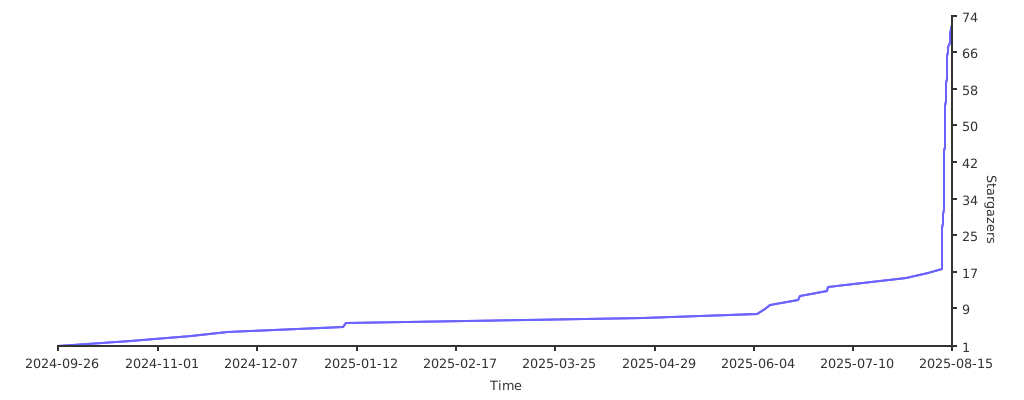
Stargazers over time
📄 License
This project is licensed under the MIT License. See the LICENSE file for details.